
Email Bulk Sender – Send, Verify & Extract Emails from One Software
Email Bulk Sender is a complete email outreach and marketing solution designed for businesses, agencies, freelancers, sales professionals, and digital marketers. It helps you manage large contact lists, prepare email campaigns, verify email addresses, and collect new contacts through a single platform.
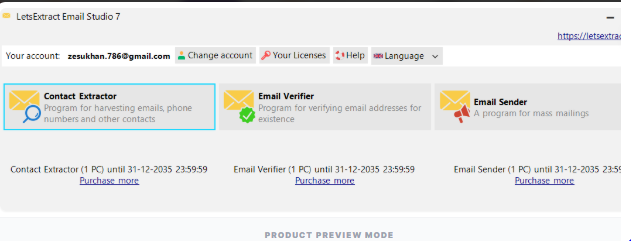
The software includes two additional tools — Email Verifier and Email Extractor — making it useful not only for sending campaigns but also for preparing and managing your email database.
Whether you are promoting a service, reaching potential customers, building a B2B prospect list, or managing business communication, this software gives you a simple way to organize your email workflow.
What Is Email Bulk Sender?
Email Bulk Sender is a software tool that helps users send emails to multiple recipients without having to send every message manually.
For businesses and marketers, sending individual emails to a large number of contacts can become repetitive and time-consuming. A centralized email campaign platform makes it easier to organize contacts, create messages, and manage outreach activities.
The software also adds two important capabilities:
- Email Verifier – Check and review email addresses before using them in campaigns.
- Email Extractor – Collect available email addresses from supported sources for prospecting and list-building.
This creates a practical workflow for users who need to find contacts, check their data, and communicate with relevant prospects.
Main Features
Bulk Email Sending
The core feature allows you to send emails to multiple recipients through one organized system.
It can be used for different business communication purposes, including:
- Promotional campaigns
- Service announcements
- Product updates
- Sales outreach
- Business introductions
- Newsletters
- Event invitations
- Customer communication
- Lead nurturing
- Company updates
Instead of repeatedly opening individual emails and entering recipients manually, you can work with your prepared contact list from one place.
Email Verifier
An email database can contain old, incorrect, or inactive addresses. Sending campaigns without reviewing your list may result in unnecessary delivery attempts and a less reliable contact database.
The built-in Email Verifier helps you check email addresses before adding them to your campaign workflow.
You can use it to:
- Review email addresses
- Identify potentially invalid addresses
- Clean contact lists
- Improve database quality
- Prepare contacts before outreach
- Reduce unnecessary sending attempts
Verification is especially useful when you regularly collect contacts from different sources or maintain large business databases.
Email Extractor
Finding business contact information manually can take a significant amount of time. The built-in Email Extractor helps collect available email addresses from supported sources.
It can be useful during prospect research and contact list building.
For example, marketers can use the tool when researching:
- Potential business customers
- B2B prospects
- Companies
- Service providers
- Business websites
- Sales opportunities
- Marketing prospects
After collecting available addresses, you can review them with the verification tool before using suitable contacts in your outreach process.
Always make sure that your use of extracted information follows applicable privacy, consent, and anti-spam requirements.
A Simple Email Outreach Workflow
One of the biggest advantages of having these features together is that you can create a simple workflow:
Find → Extract → Verify → Organize → Send
First, identify relevant prospects.
Next, collect available email addresses using the extraction feature.
Then, review the addresses with the verification tool.
After that, organize your contacts and prepare your campaign.
Finally, send your message to the appropriate recipients.
This approach keeps the different stages of your outreach process connected instead of requiring several unrelated applications.
Designed for Business Email Marketing
Email remains an important communication channel for many businesses. Companies use it to communicate with customers, prospects, partners, subscribers, and other relevant contacts.
This platform can support different types of business communication, such as:
Marketing: Share information about products, services, offers, and company updates.
Sales: Reach relevant prospects and introduce your services.
Customer communication: Send useful updates and information to existing customers.
Lead generation: Build and organize prospect databases for future outreach.
Business development: Contact potential partners and opportunities.
The exact campaign strategy depends on your business, audience, and communication goals.
Useful for Lead Generation
Lead generation usually involves more than simply sending an email.
You first need to identify potential prospects. Then you need relevant contact information, a reasonably clean database, and a communication strategy.
The three tools included in this software can support those stages.
The Email Extractor helps with contact discovery.
The Email Verifier helps with reviewing collected addresses.
The bulk sending feature helps you communicate with selected contacts.
This makes the software useful for professionals who regularly perform prospect research and email-based outreach.
For Digital Marketing Agencies
Agencies often handle marketing activities for multiple businesses. Email outreach can become part of their lead-generation and client-acquisition process.
With one platform, agencies can manage activities such as:
- Prospect research
- Contact list preparation
- Email verification
- Campaign preparation
- Promotional outreach
- Business development
- Lead generation
Instead of switching between multiple applications, teams can use a centralized workflow for these email-related tasks.
The software can also be incorporated into an agency’s existing marketing process alongside other channels such as WhatsApp, social media, search, and paid advertising.
For Freelancers and Service Providers
Freelancers often need to find potential clients and introduce their services.
For example, a web developer may research businesses that need a new website. A marketing consultant may identify companies that could benefit from digital marketing services.
The software can support the contact-research and outreach process by helping users collect available email addresses, review their contact lists, and prepare campaigns.
It can be useful for professionals offering:
- Web development
- SEO
- Digital marketing
- Graphic design
- Software development
- Consulting
- Social media management
- Business services
The key is to keep outreach relevant and send messages only where the recipient can legitimately be contacted.
For Sales Teams
Sales professionals frequently work with large prospect databases.
Managing those contacts manually can make the outreach process difficult to organize. A centralized platform can make it easier to prepare lists and execute campaigns.
A sales workflow could look like:
- Research relevant businesses.
- Collect available contact information.
- Review the addresses.
- Segment contacts according to the campaign.
- Prepare a personalized message.
- Send the campaign.
- Manage follow-up activities separately.
This allows sales teams to maintain a more structured approach to email prospecting.
Email List Management
A successful campaign starts with a relevant contact list.
Rather than treating every email address the same, businesses can organize contacts based on factors such as:
- Industry
- Location
- Business type
- Customer category
- Prospect type
- Campaign purpose
- Previous communication
Better organization can make it easier to send relevant messages to the right audience.
The verification feature can also be used during the preparation stage to help maintain cleaner contact data.
Email Marketing for Different Campaigns
Different businesses have different communication requirements.
The software can be used for campaigns such as:
Product Promotion
Introduce a new product or explain an existing service to relevant contacts.
Service Promotion
Reach potential customers who may have a genuine need for your service.
Business Outreach
Introduce your company to potential business partners or prospects.
Event Communication
Share event information, invitations, or updates with appropriate contacts.
Newsletter Distribution
Send regular content or business updates to subscribers who have opted to receive them.
Sales Prospecting
Communicate with relevant prospects as part of a structured sales process.
Key Benefits
Save Manual Work
Sending individual emails repeatedly can consume valuable time. A centralized campaign system can simplify the process.
Manage Contacts Efficiently
Keep your email lists organized and prepare them before launching a campaign.
Review Email Addresses
The verification feature provides an additional step for checking your contact database.
Build Prospect Lists
The extraction tool can support research and contact collection from supported sources.
One Centralized Platform
Sending, verification, and extraction capabilities are available within the same software.
Support Business Growth
Businesses can incorporate email outreach into their broader sales and marketing strategy.
Suitable for Different Users
From individual freelancers to marketing agencies and sales teams, the platform can support different email-related workflows.
Who Can Use This Software?
This solution can be useful for:
- Business owners
- Digital marketers
- Marketing agencies
- Sales professionals
- Lead generation specialists
- Freelancers
- Entrepreneurs
- B2B companies
- Software agencies
- Consultants
- Service providers
- Business development teams
- Recruitment professionals
The best use case depends on your audience, campaign strategy, and applicable communication requirements.
Why Combine Sending, Verification and Extraction?
Normally, users may need separate applications for finding email addresses, checking those addresses, and sending campaigns.
That creates additional steps.
With these three capabilities available together, the workflow becomes easier to manage:
Email Extractor
Collect available contact information from supported sources.
Email Verifier
Review addresses before they are considered for campaign use.
Bulk Email Sender
Communicate with the appropriate contacts through your campaign.
The result is a more connected workflow for email-based prospecting and marketing.
Important Email Marketing Practices
Bulk email technology should always be used responsibly.
Before sending a campaign, make sure that:
- Your recipients are appropriate for the communication.
- You follow applicable privacy and anti-spam regulations.
- You have the required permission or lawful basis where applicable.
- Your message clearly identifies the sender.
- You provide an unsubscribe option where required.
- You respect opt-out requests.
- Your content is accurate and not misleading.
- You avoid sending irrelevant or deceptive messages.
Using a clean and relevant contact database is also important for maintaining a professional communication process.
Frequently Asked Questions
1. What is Email Bulk Sender?
Email Bulk Sender is a software solution that allows businesses and professionals to manage email campaigns and send messages to multiple recipients from a centralized platform.
2. Does the software include Email Verifier?
Yes. An Email Verifier is included to help users review email addresses before using them in their campaigns.
3. What does the Email Extractor do?
The Email Extractor helps collect available email addresses from supported sources. It can be used for prospect research and contact list building.
4. Can this software be used for lead generation?
Yes. Its extraction, verification, and sending capabilities can support an email-based lead-generation workflow.
5. Who can use it?
Businesses, agencies, marketers, freelancers, sales teams, and other professionals can use it for appropriate email communication and outreach.
6. Is it useful for digital marketing agencies?
Yes. Agencies can use the platform for prospect research, contact preparation, business outreach, and marketing campaigns.
7. Why verify emails before sending?
Reviewing addresses can help identify potentially invalid or problematic contacts and maintain a cleaner email database.
8. Can freelancers use it for client outreach?
Yes. Freelancers can use it to research relevant prospects and manage legitimate service-related email outreach.
Final Overview
Email Bulk Sender brings email sending, contact verification, and email extraction together in one platform.
The main sending functionality helps you manage campaigns to multiple recipients. Email Verifier helps you review your email database, while Email Extractor supports contact discovery and prospect research from supported sources.
Together, these tools create a simple workflow:
Extract → Verify → Organize → Send
Whether you are a business owner, digital marketer, freelancer, sales professional, or agency, this platform can help you manage your email outreach activities from one place.
Connect With Sikander X Marketing
Stay updated with the latest automation tools, lead generation strategies, and software demos.
Follow us on:



Reviews
There are no reviews yet.