







Google Map Data Extractor: The Smart Way to Generate Local Business Leads in 2026
What is Google Map Data Extractor?
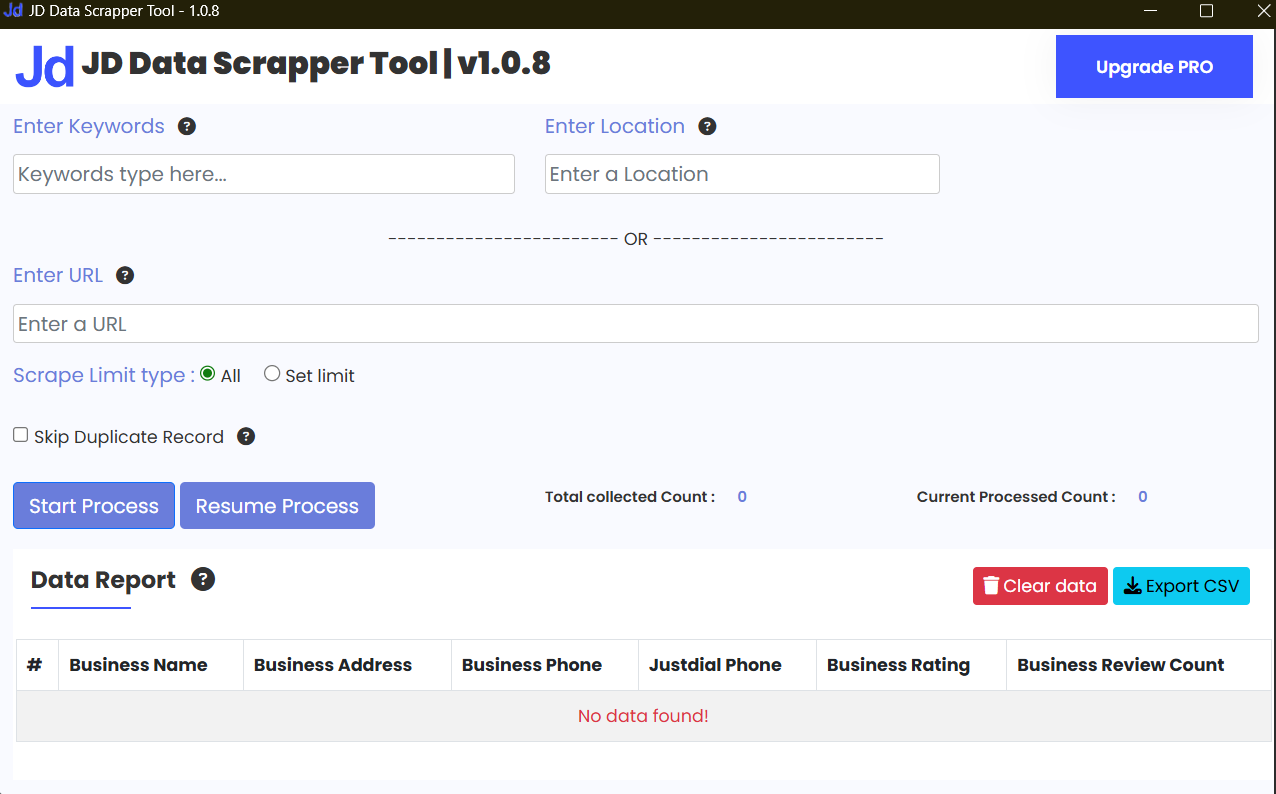
A Google Map Data Extractor is a software tool that automatically collects publicly available business information from Google Maps such as business names, phone numbers, emails, addresses, ratings, and website links.
How does Google Map Data Extractor work?
It searches Google Maps using a keyword and location, then extracts business listings into a downloadable file like CSV or directly into a CRM system.
That’s it. Simple. No rocket science.
It works like a Local Business Data Extractor, but smarter and faster.
Why Manual Lead Collection from Google Maps is Inefficient
Let me ask you something.
Have you ever tried copying 300 business listings manually?
You:
Search a keyword
Open each listing
Copy phone number
Paste into Excel
Repeat 300 times
Sounds painful, right?
Here’s what usually happens:
1. Time Waste
Collecting 500 leads manually can take 6–8 hours. With a Google Maps Scraper Tool, it takes minutes.
2. Human Error
Missed numbers. Wrong emails. Duplicate entries.
Manual work = mistakes.
3. No Scaling
You can manually extract 100 leads.
But what about 10,000 across Delhi, Mumbai, and Bangalore?
Impossible without automation.
4. No Automation
Manual data means no Lead Generation Automation, no CRM sync, no follow-up automation.
And in 2026, automation wins.
How Google Map Data Extractor Works (Step-by-Step)
Don’t worry. It’s not technical.
Here’s how most tools work:
Step 1: Enter Keyword
Example:
“Digital Marketing Agency in Delhi”
Step 2: Choose Location
You can target:
Delhi
Mumbai
Bangalore
Or even specific PIN codes
This makes it a powerful Targeted Leads Generator.
Step 3: Select Category / Filters
Choose:
Rating filter (4+ stars)
Verified listings
Website available
Now your data becomes cleaner.
Step 4: Extract Business Listings
The Google Maps Leads Extractor scans listings and collects:
Business Name
Phone Number
Address
Website
Step 5: Extract Emails from Google Maps
Some advanced tools also:
Visit website automatically
Use Email Extractor Software
Pull business emails from contact pages
This is where it becomes a serious Business Contact Extraction system.
Step 6: Export to CSV or CRM
You can:
Download CSV
Upload to WhatsApp sender tools
Sync using CRM Integration with Data Extractor
And boom — your outreach campaign is ready.
Types of Data You Can Extract
A good Automated Data Extraction Tool can collect:
Business Names
Phone Numbers
Emails
Website URLs
Ratings
Reviews Count
Business Categories
Full Addresses
Latitude & Longitude (in some tools)
This makes it more than just scraping. It becomes structured Data Scraping for Digital Marketing.
Who Should Use It?
Let’s get practical.
Digital Marketing Agencies in India
If you’re running campaigns in Delhi or Mumbai, you need bulk local leads daily.
A Bulk Lead Generation Tool helps you target:
Clinics
Restaurants
Gyms
Real estate developers
Real Estate Consultants
Imagine targeting:
“Property dealers in Bangalore”
You extract 500 agents.
Start partnership outreach.
Close 3 deals.
Simple math.
Local SEO Agencies
Want clients ranking on Google Maps?
Use a Google Maps Scraper Tool to find under-optimized businesses.
Freelancers
If you’re just starting, you can:
Extract leads
Offer website design
Offer WhatsApp automation
Offer paid ads service
All using one Business Leads Extractor Software.
B2B Service Providers
A B2B Lead Scraper helps find:
Manufacturers
Exporters
Distributors
This is gold for cold outreach.
Real-World Use Cases
Let’s make it real.
1. Indian Digital Marketing Agency Example
A small agency in Delhi targets:
“Dentists in Delhi NCR”
They use a Google Maps Leads Extractor, collect 800 listings, filter 4+ star clinics, and send personalized WhatsApp outreach.
Result?
12 new clients in 30 days.
2. Real Estate Agency Example
A Mumbai realtor extracts:
“Interior Designers in Mumbai”
They partner with 15 designers for referrals.
Lead cost? Almost zero.
3. Local Service Provider Example
A website developer in Bangalore extracts:
“CA firms in Bangalore”
He offers accounting website redesign services.
Conversion rate increases because leads are hyper-targeted.
4. SaaS Cold Outreach Example
A SaaS founder selling CRM software uses:
Extract Emails from Google Maps
Combine with Social Media Lead Extractor
Run LinkedIn + email sequence
That’s multi-channel Lead Generation Automation.
Benefits for Agencies & Businesses
1. Faster Lead Generation Automation
What takes days manually now takes minutes.
2. Highly Targeted Local Outreach
Instead of random cold lists, you get:
“Restaurants in South Delhi with 3–4 star ratings”
That’s precision marketing.
3. Lower Cost Per Lead
No Facebook ads.
No Google ads.
Just smart extraction.
4. Scalability
Today Delhi.
Tomorrow Mumbai.
Next week Bangalore.
That’s real growth.
Monetization Ideas
Here’s where it gets interesting.
1. Sell Local Business Leads
Package:
“500 verified gym owners in Delhi”
Charge per list.
2. Offer Google Maps Scraping Service
Many businesses don’t know how to use automation tools.
You extract data for them.
3. Build a Lead Generation Agency
Use Business Leads Extractor Software internally.
Deliver ready-to-contact leads to clients.
4. Build Your Own SaaS Tool
Create a simplified Google Maps Scraper Tool and sell subscriptions.
5. White-Label Solution
Offer branded Bulk Lead Generation Tool to other agencies.
Students can literally start with zero office.
Just laptop + internet + automation knowledge.
Common Mistakes Beginners Make
Let’s avoid disaster.
1. Scraping Without Targeting
Don’t extract “All businesses in India.”
Be specific.
2. No Data Cleaning
Always remove:
Duplicates
Incomplete records
Fake listings
3. Spamming
If you send 1000 identical emails, you’ll get blocked.
4. Ignoring Compliance
Different regions have different marketing rules.
5. No Personalization
Mention:
“Hi Dr. Sharma, I saw your clinic in Lajpat Nagar…”
Small personalization = big response rate.
Legal & Ethical Considerations
This part is very important.
1. Use Public Data Only
A Google Map Data Extractor collects publicly available business data.
Do not attempt to access private systems.
2. Respect Google Policies
Avoid aggressive scraping.
Use tools responsibly.
3. Avoid Spam
Follow email marketing best practices.
Provide opt-out options.
4. Follow Indian IT Rules
India has IT compliance laws around misuse of digital data.
5. GDPR & CAN-SPAM
If contacting international businesses:
Provide unsubscribe option
Avoid misleading subject lines
Don’t store data irresponsibly
Automation is powerful.
Use it ethically.
Future of Google Maps Data Extraction
The future looks exciting.
AI Filtering
AI will auto-score businesses based on:
Activity
Review growth
Website quality
Smart Prospect Scoring
Tools will identify “High probability buyers.”
Hyper-Local Automation
Target:
“Salons within 2 km of Connaught Place”
Social Media Integration
Combine:
Social Media Lead Extractor
Email scraping
WhatsApp automation
One dashboard. Full automation.
That’s where we’re heading.
Frequently Asked Questions (FAQ)
1. Is GMap Data Extractor legal in India?
Yes, if you extract publicly available business data and avoid spam. Always follow IT regulations and email marketing compliance rules.
2. Can I extract emails from Google Maps directly?
Google Maps doesn’t show emails directly, but advanced tools can visit business websites and extract emails automatically.
3. Who should use a Google Maps Leads Extractor?
Digital marketers, real estate agents, freelancers, SaaS founders, and local SEO agencies can all benefit.
4. How many leads can I extract daily?
It depends on the tool and limits, but many Bulk Lead Generation Tool platforms can extract thousands of listings per day.
5. Can I connect extracted data to my CRM?
Yes. Many tools support CRM Integration with Data Extractor systems for automated follow-ups.
6. Is this useful for B2B marketing?
Absolutely. A B2B Lead Scraper can help you find manufacturers, distributors, agencies, and service providers for cold outreach.
Final Thoughts
Lead generation is no longer about working harder.
It’s about working smarter.
A Google Map Data Extractor helps you:
Save time
Reduce cost
Scale outreach
Automate follow-ups
Whether you’re a student learning automation or running a full digital agency in Mumbai, this tool can become your secret weapon.
Just remember:
Target smart.
Clean your data.
Personalize outreach.
Stay compliant.
And let automation do the heavy lifting.
Connect With Sikander X Marketing
Stay updated with the latest automation tools, lead generation strategies, and software demos.
Follow us on:


Reviews
There are no reviews yet.